
Loading page
Finance & AfP
Raise Applications for Payment, invoices and commercial records from the same operational information used to manage project delivery.
ROVEYA ADMIN · ROVEYA OPS · ROVEYA HUB
| Figure | Covers | Amount |
|---|---|---|
| Gross value to date | Cumulative | £543,250 |
| Previously applied | Cumulative | £328,450 |
| This application (gross) | This period | £214,800 |
| Retention at 3% | This period | − £6,444 |
| CIS deduction (recorded) | This period | − £26,412 |
| Net payable | This period | £181,944 |
The challenge
When the application is assembled from messages, exported hours and separate project notes, the commercial team has to reconstruct the backup before it can review value. Roveya keeps the application with its project and supporting records, so the review starts from the work already recorded.
Roveya
One commercial record
Applications, invoices, CIS, corrections, payments and audit history held against the project and the work that was delivered.
How Roveya responds
Nine stages across three interfaces. The work, the value and the commercial record stay connected throughout.
Roveya OpsCaptures activity and supporting evidence
Roveya AdminManages the commercial workflow
Roveya HubSupports approvals and management action
Roveya AdminInvoices, payments and the commercial position
The commercial team should not need to recreate the delivery story. Before they can value or bill the work, the record should already be there.
From site to payment
Valuations, certificates and invoices draw on the same site records, with the evidence one click away.

Application
Example data shown.
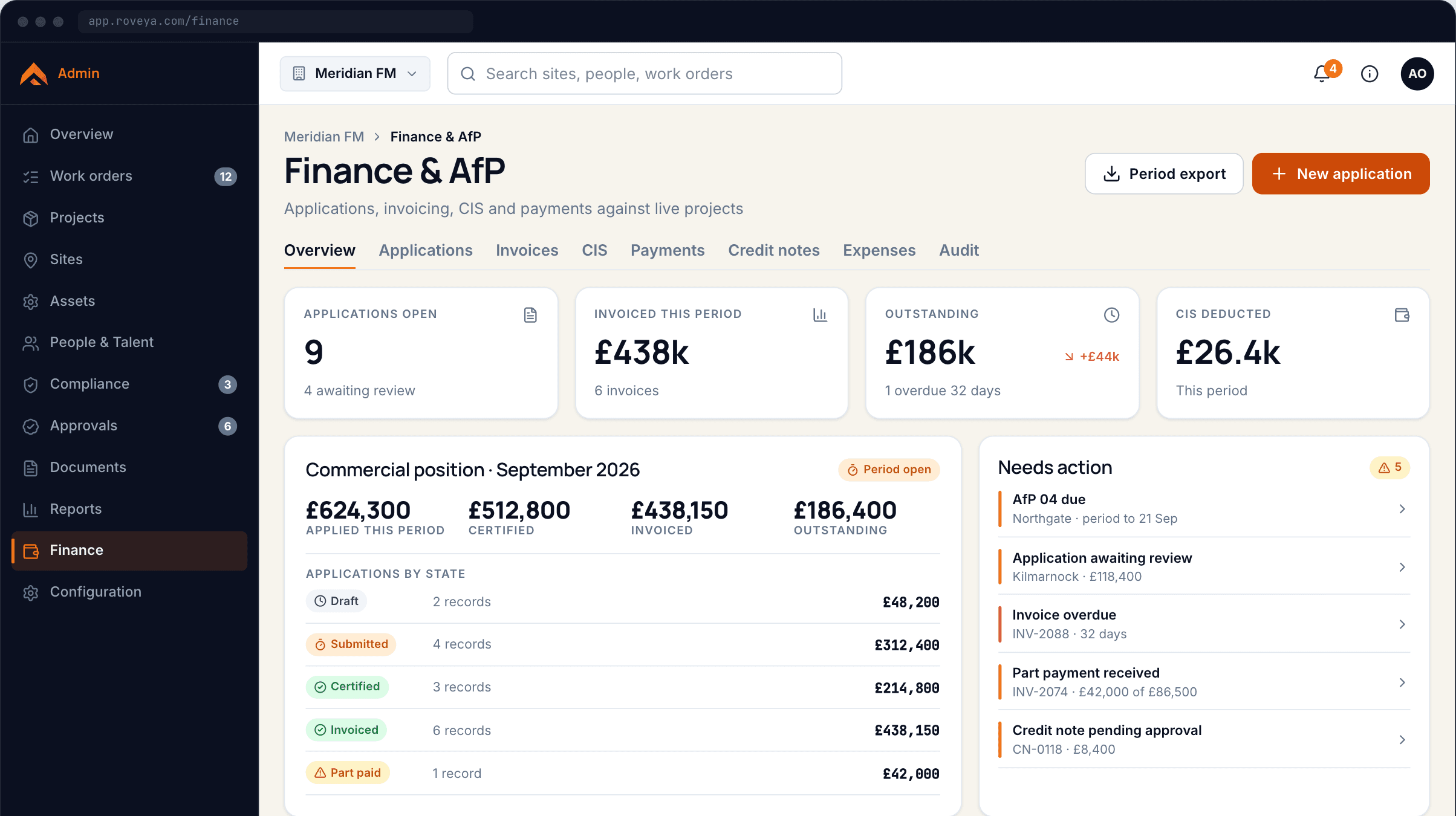
Commercial position
Applications raised, what is awaiting action, invoices, payments and outstanding value — read against the projects they came from.
Applications for payment
An application carries its client, project, valuation period, gross value, previous applications, retention, CIS position and the records that support it.
The application sets out the value being requested for a period and keeps the supporting project evidence alongside it. Submitted, certified, invoiced and paid describe different positions. Keep those stages visible so a request for payment is not mistaken for agreed value or money received.
| Field | Covers | Value |
|---|---|---|
| Contract value | Contract | £1,840,000 |
| Gross value to date | Cumulative | £543,250 |
| Previously applied | Cumulative | £328,450 |
| This application (gross) | This period | £214,800 |
| Retention at 3% | This period | − £6,444 |
| CIS deduction (recorded) | This period | − £26,412 |
| Net payable | This period | £181,944 |
| Application | This period (gross) | Cumulative gross | State |
|---|---|---|---|
| AfP 01 18 May – 21 Jun | £86,500 | £86,500 | Paid · INV-2069 |
| AfP 02 22 Jun – 21 Jul | £142,050 | £228,550 | Paid · INV-2081 |
| AfP 03 22 Jul – 21 Aug | £99,900 | £328,450 | Certified 15 Sep · INV-2092 awaiting approval |
| AfP 04 22 Aug – 21 Sep | £214,800 | £543,250 | Draft |
AfP 01–03 were certified at the value applied, so certified to date is £328,450. Example data shown.
Internal review is not client certification. The states are configurable per client and contract; Roveya does not impose contractual terminology it cannot support.
Evidence
Work orders, timesheets, inspection records and photographs provide the context for commercial review. The person preparing the application selects the relevant support and reviews the valuation.
The presence of evidence does not automatically value the work or certify the application. Not every application needs every kind of evidence.
Behind AfP 04 · 54 records from the project record
Example data shown.
Invoices
An invoice raised from a certified application inherits the client, project and certified value, and keeps the link to that application.
Certified value and the invoice are separate, linked records: a certificate is the client’s agreement of value; the invoice is the request for that amount.
INV-2091 · COASTWAY
Harbour Gate drainage
| Invoice | Net | Due | Payment state |
|---|---|---|---|
| INV-2092 · Northgate Retail Park Meridian FM · from AfP 03 | £99,900 | On issue | Draft · awaiting approval |
| INV-2091 · Harbour Gate drainage Coastway · from AfP 05 | £164,200 | 18 Oct | Issued |
| INV-2088 · Riverside Depot Meridian FM · from AfP 02 | £86,500 | 20 Sep | Overdue |
| INV-2084 · Harbour Gate drainage Coastway · from AfP 04 | £96,000 | 13 Sep | Paid |
| INV-2081 · Northgate Retail Park Meridian FM · from AfP 02 | £142,050 | 04 Sep | Paid |
| INV-2074 · Riverside Depot Meridian FM · from AfP 01 | £86,500 | 17 Aug | Part paid · £44,500 outstanding |
Each invoice holds its number, client, project, net value, VAT, issue and due dates, payment state and linked application. Example data shown.
Approvals
The approver sees the client, the project, the value and the records behind it — enough context to decide without opening the full application.
Example data shown. The actions available depend on the approver’s role and the record type.
Commercial controls
CIS, corrections, payments, expenses, history and audit all read from the application and invoice above. None of them is a separate ledger.
Roveya records deductions as part of the workflow and is not tax-advice software. Return submission to HMRC is not part of the product. Bank-feed matching is not included.
For any accounting connection, check its individual status in Integrations.
Keep the recorded deduction and its supporting records with the commercial transaction. Gross value, the recorded deduction, the net amount and the transaction it belongs to are held against the project and subcontractor.
A credit note carries its reason, value, user, date and audit reference. The original invoice is not edited. Reversal and re-application are available where the contract needs them.
Payments are recorded against the invoice and the application behind it, so outstanding value reads per client and per project. A part payment keeps the remaining value visible.
Each expense is recorded against a project and a person, with a category, a receipt and an approval.
Mileage rules, card feeds and payroll reimbursement are not part of the product.
Quote, applications, invoices, credit notes, payments and the evidence behind them, in the order they happened.
Every commercial event records the user, the time, the action, the record and the value where one applies.
Who uses it
Raising an application, approving it and recording a payment are three different permissions. Operational users do not get every financial record.
| Role | Works on | Typical actions | Interface |
|---|---|---|---|
| Finance team | Applications, invoicing, CIS, payments and corrections. | Create · Invoice · Record · Report | Roveya Admin |
| Commercial manager | Valuation, applications and the commercial position by project. | Create · Review · Approve · Report | Roveya Admin · Roveya Hub |
| Project manager | The commercial position on their own projects. | Review · Report | Roveya Admin · Roveya Hub |
| Operations manager | Delivered work behind the value, and commercial exceptions. | Review · Monitor | Roveya Hub · Roveya Admin |
| Approver | Applications, invoices and expenses waiting on a decision. | Review · Approve · Reject | Roveya Hub |
| Leadership | Commercial position and outstanding value only. | Monitor | Roveya Hub |
Field teams capture the work, hours and evidence in Roveya Ops; they do not make financial approvals.
Questions
An Application for Payment records value requested for a period. Certification records the value certified; the invoice is a separate linked commercial record. A payment records money received, including any part-paid or outstanding position. They should not be treated as interchangeable states.
No. Work, hours, inspection results and photographs support the commercial review. A person reviews the relevant records and valuation; evidence capture does not itself certify an amount or authorise payment.
Return submission to HMRC and bank-feed matching are not included. Finance & AfP keeps the operational commercial record connected to the work. Check the Integrations directory for the individual status of any accounting connection you need.
Next step
