Loading page
Compliance & RAMS
Create, issue, review and retain RAMS, inspections, certifications and operational evidence against the people, projects and sites they relate to.
ROVEYA ADMIN · ROVEYA OPS · ROVEYA HUB
The challenge
A document in a folder does not tell you which version reached the team, who acknowledged it or what evidence came back. Roveya connects the document, its recipients and the work it applies to, so outstanding actions can be reviewed against a specific record.
Roveya
One compliance record
Documents, evidence, signatures, approvals and audit history held against the people, projects and sites they relate to.
How Roveya responds
Nine stages, three interfaces. The document, the evidence and the decision stay on the same record throughout.
The compliance record should travel with the work. Each compliance record belongs to something operational — a project, a site, a worker, a team or an activity.
Safety on the record
Issued, viewed and signed are separate recorded states, so you can see who has actually acknowledged what.

RAMS
Example data shown.
RAMS
A RAMS in Roveya carries its project, activity, hazards, controls and responsibilities — and the signatures and evidence that came back from site.
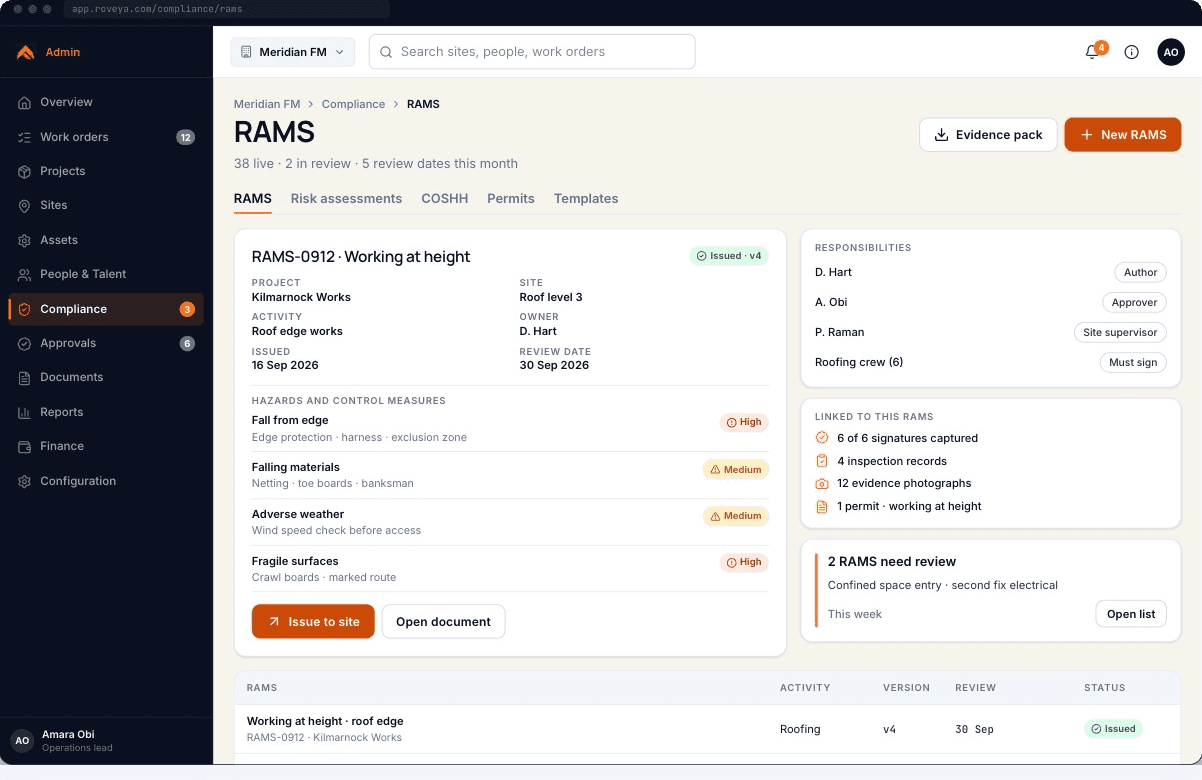
A guided structure rather than a blank document: project, activity, hazards, controls, PPE, people, attachments, review, approval.
AI-assisted, human-reviewed. Review, edit or discard the proposed content before it becomes part of the record. It does not approve, issue or sign a compliance record. Approval remains a human decision.
Issue
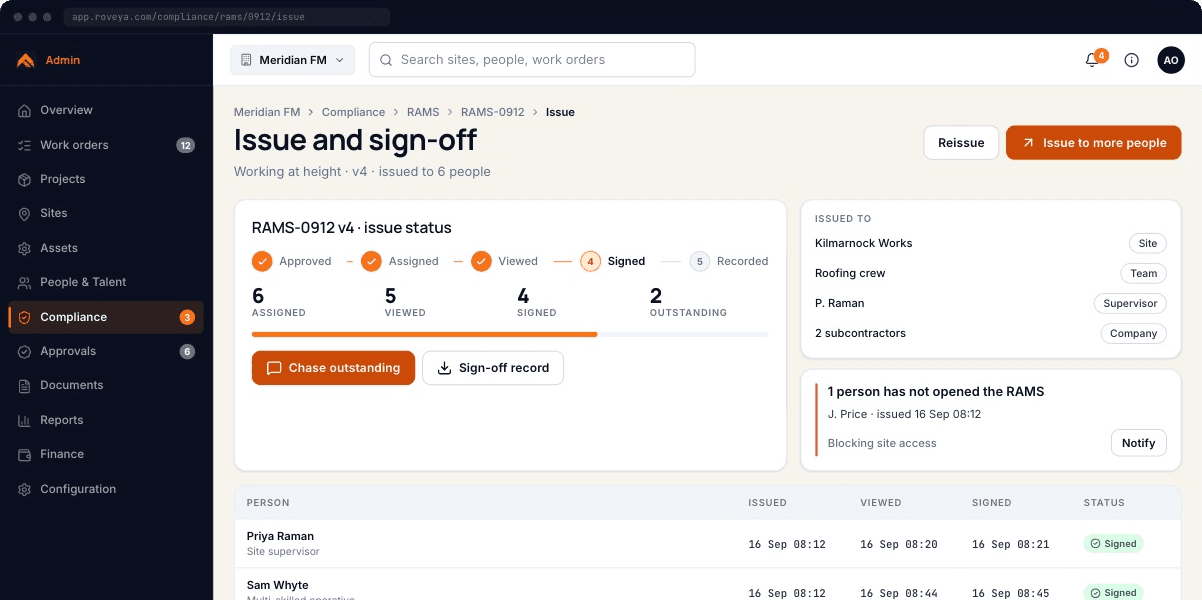
Issue is tracked per person: who it went to, who opened it, who signed, and who has not.
An approved RAMS is not yet evidence that everyone has seen it. Keep issued, viewed and signed states separate for each person, and identify outstanding responses against the relevant version. The compliance team can follow up the actual gap rather than resend the same document to everyone.
| Person | Viewed | Signed | State |
|---|---|---|---|
| Priya RamanSite supervisor | 16 Sep 08:20 | 16 Sep 08:21 | Signed |
| Sam WhyteMulti-skilled operative | 16 Sep 08:44 | 16 Sep 08:45 | Signed |
| Tom BerwickPlant operator | 16 Sep 09:02 | No signature recorded | Viewed |
| Josh PriceElectrician | No viewing recorded | No signature recorded | Outstanding |
| Ellen OkaforCleaning team lead | 02 Sep 07:55 | 02 Sep 07:56 | Superseded |
Evidence
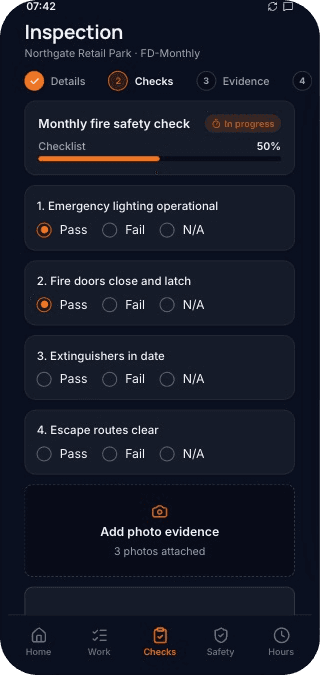
Evidence recorded where the work happened carries the person, the place and the moment with it.
The inspection is assigned to a person, a site and a category. What comes back lands on the operational record, not in an inbox: responses, photographs, notes and a score where the check is scored.
Registers
Three registers that sit behind the work: who is certified, which version is current, and which substances are controlled.
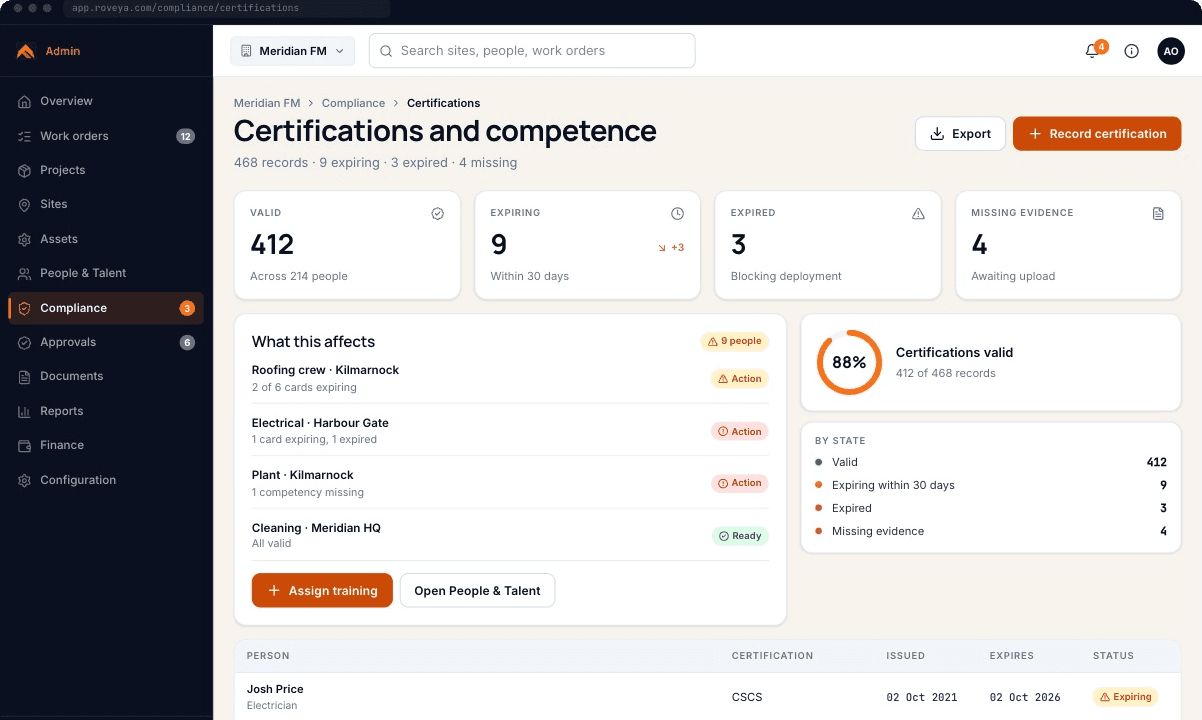
Review the certification record against the person and the work they are expected to do. Valid, expiring, expired and missing states make the gap visible to the responsible manager. The record is shared with People & Talent; deployment remains a management decision.
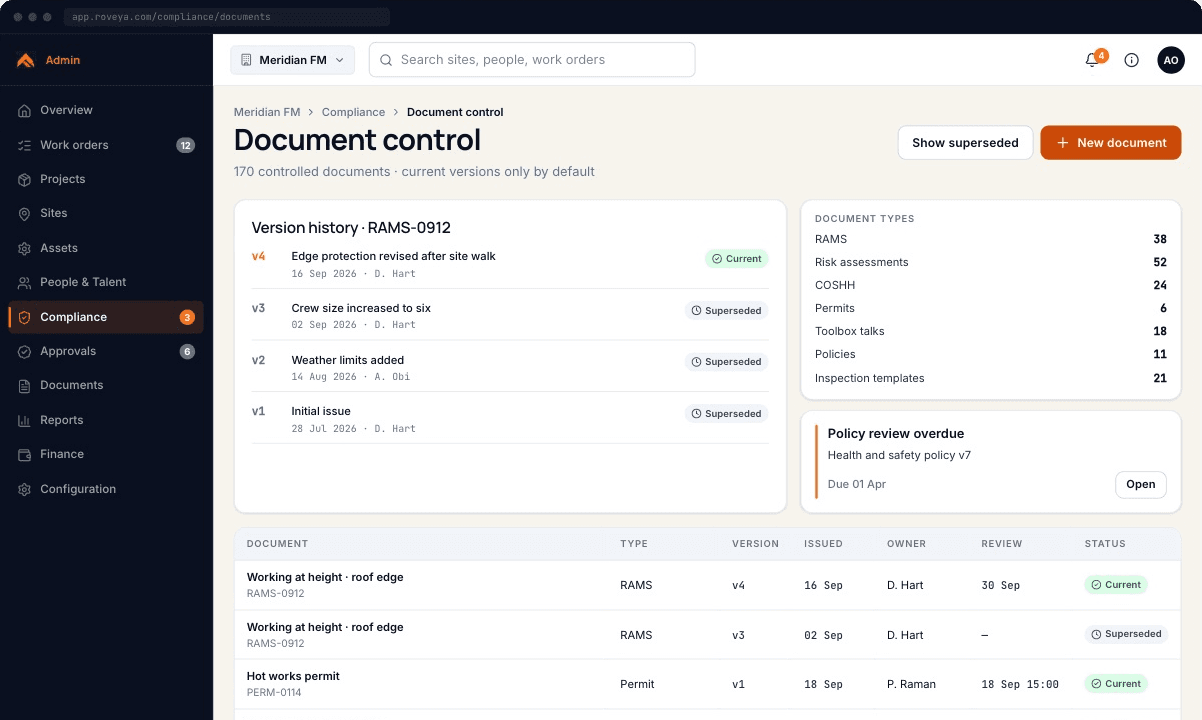
One current version, an owner, a review date and everything it replaced — so nobody works from last month’s document.
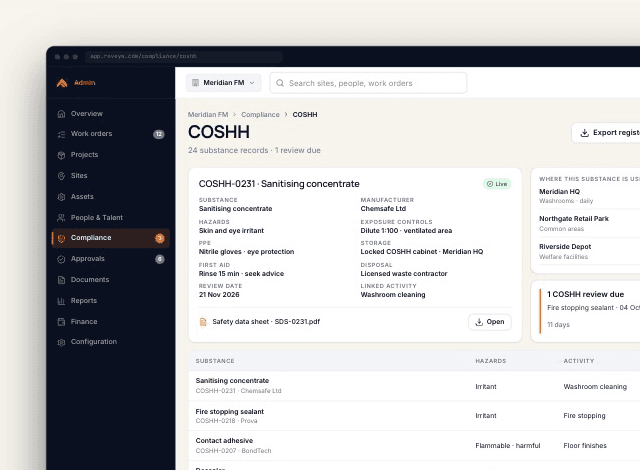
A COSHH record is held against the activity and the sites it is used on, with the safety data sheet attached to it.
The COSHH register and records are part of Compliance & RAMS.
Permits
Hot works, working at height, confined space, electrical isolation and excavation each need a clear activity, responsible person, validity window and closure record. Keep those details together so the responsible team can review the permit in the context of the work.
Toolbox talks
Group or individual assignment, signatures captured in sequence on a shared device, and the completion recorded against the talk.
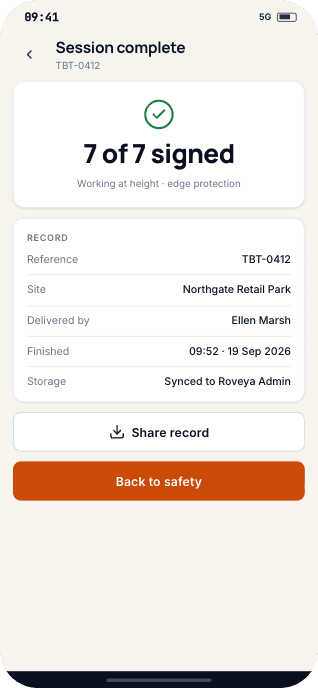
The full flow, from choosing a talk to the completion record, is shown on Roveya Hub.
Exceptions
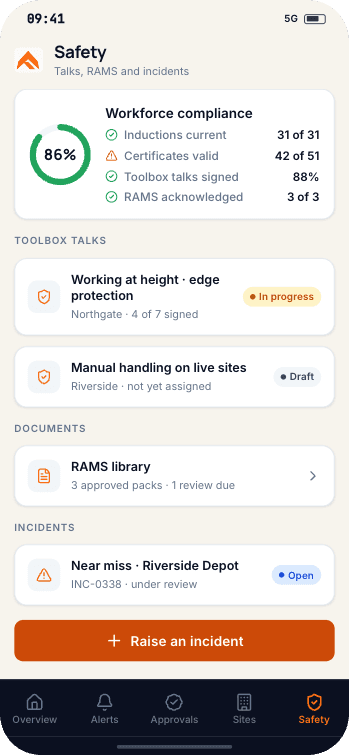
Example data shown. Review · Approve · Return · Assign · Escalate · Open record.
Audit
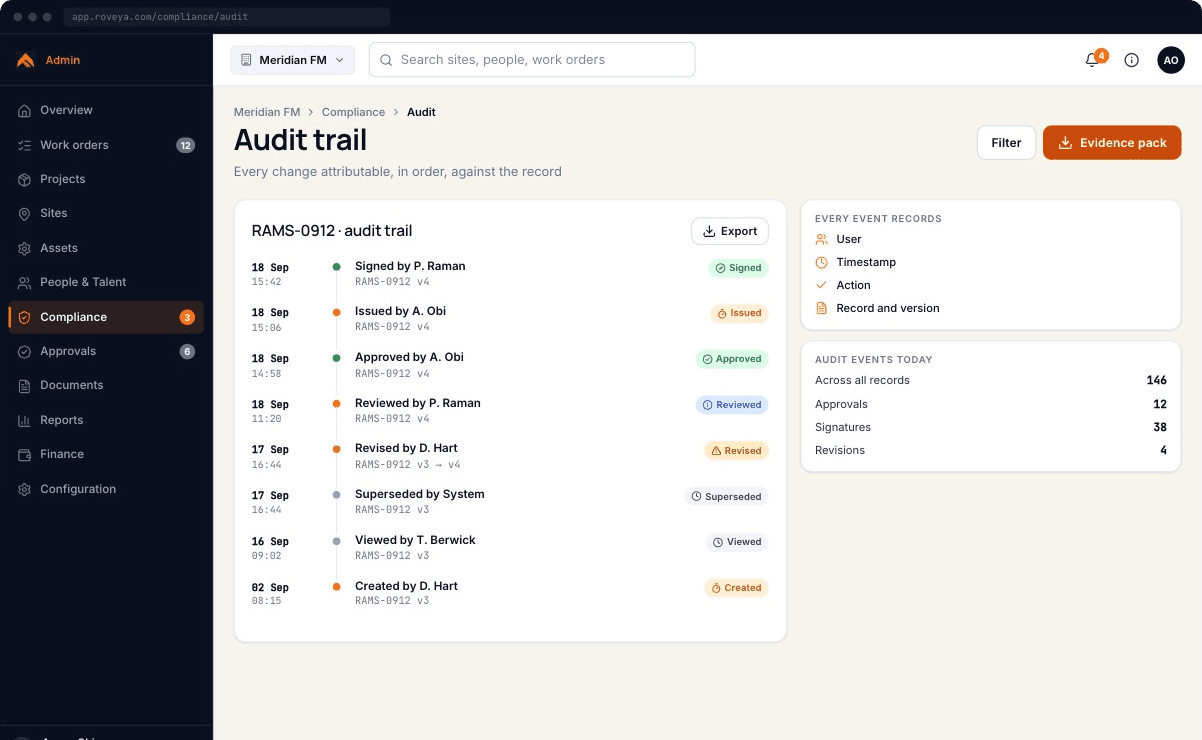
An evidence pack comes out of the system in the order things happened, rather than being assembled afterwards.
Who uses it
Creating a RAMS, approving it and completing the work against it are three different permissions.
| Role | Responsibility | Can | Surfaces |
|---|---|---|---|
| Compliance team | Create, revise, review and retain every record. | Create · Review · Approve · Monitor | Roveya Admin |
| Operations manager | Exceptions, approvals and compliance position for their region. | Review · Approve · Monitor | Roveya Hub · Roveya Admin |
| Project manager | Documents and evidence on their projects and sites. | Review · Monitor | Roveya Admin · Roveya Hub |
| Supervisor | Issue talks, complete checks and sign off on site. | Complete · Review | Roveya Ops · Roveya Hub |
| Field operative | Read the RAMS, complete the check, capture the evidence. | Complete | Roveya Ops |
| Leadership | Compliance position and critical exceptions only. | Monitor | Roveya Hub |
Questions
No. Issue, viewing and signing are separate recorded states. The per-person view shows who received the document, who viewed or signed it and what is outstanding against the version concerned.
The certification record is shared. Compliance teams review its status and evidence; people and operations teams read the relevant readiness position. That avoids maintaining a second certification record for the same person.
The history connects recorded actions to the user, time, record and version. It supports a review of how the document was created, revised, approved, issued and acknowledged, alongside the evidence retained with it. It does not replace the responsible person’s compliance judgement.
Next step