
Loading page
Field Operations
Plan the work, deploy teams, capture activity, manage issues and keep the back office updated from one connected operating record.
ROVEYA ADMIN · ROVEYA OPS · ROVEYA HUB

The challenge
When instructions sit in one place and the evidence comes back in messages, the office has to work out what happened before it can act. Roveya keeps the work, its site, the evidence and any follow-up together, so an unfinished job is distinguishable from one waiting for review.
Roveya
One operational record
Planning, field activity, evidence, issues and reporting held against the same projects, sites and people.
How Roveya responds
Nine stages, three interfaces, one record. Each stage is picked up by the surface built for it.
Roveya Admin
Planning and coordination
Roveya Ops
Field execution and evidence
Roveya Hub
Attention, review and decisions
Roveya Admin
Reporting and commercial follow-through
What happens in the field should not be typed again in the office.
One field day
What the team does on site arrives in the office as a record, with the photos and signatures already attached.

Work order
Example data shown.
Field teams
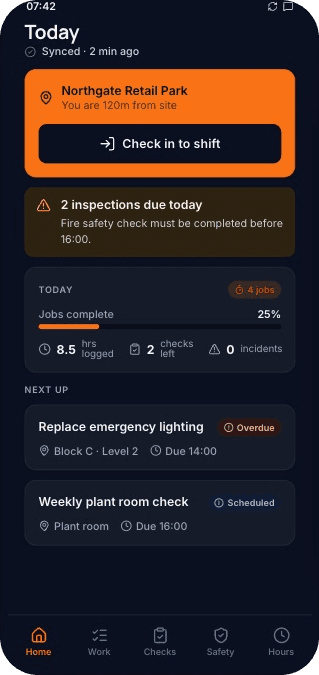
Plan and assign work in Admin. The operative sees the site, the work due and the information needed to carry it out in Ops. Recorded progress and issues stay with that work, giving the office a usable update rather than another separate message.
Planned in Admin, done in Ops
Evidence
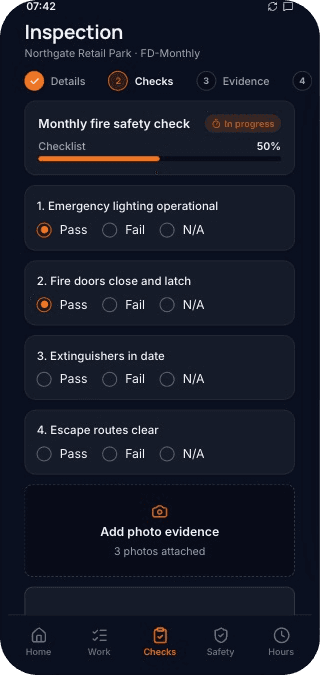
Evidence is recorded alongside the work rather than reconstructed later from memory, photos and messages.
Inspection answers, notes and photographs stay with the check they explain. A reviewer can see the finding in context and decide what needs attention without first matching loose photographs to a job.
Every record carries who captured it, where and when — so an evidence pack comes out of the system rather than being assembled afterwards.
Saved documents stay readable with no signal. Offline Working
Safety
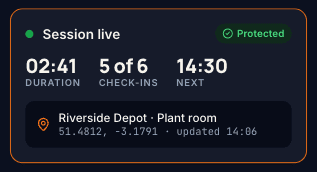
Safety runs in the same app as the work, and safety records are reviewed alongside the rest of the operation.
Exceptions
The field user raises the issue on site against the job. Photographs and notes are attached to the same issue record.
Managers review the exception in Hub with its site and evidence. The office assigns an owner and a due date in Admin.
The owner carries out the follow-up. Progress and any further evidence are recorded on the issue.
The outcome is recorded on the same issue, with who closed it and when. The evidence stays with the record.
An operative raises the issue in Ops and attaches the evidence. The office coordinates follow-up in Admin, while managers use Hub to review the exception and take the actions available to their role. The owner, progress and recorded outcome remain with the issue. Raising an issue is not the same as resolving it.
Sites and attention
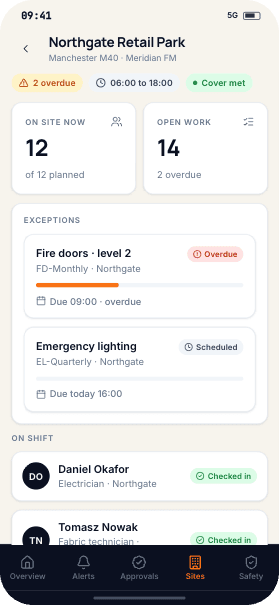
The office reads the portfolio in Admin. The manager reads one site in Hub. Both are the same numbers.
Example data shown.
Management works by exception. Roveya Hub brings the overdue, the escalated and the waiting to the manager rather than asking them to chase updates.
Who uses it
Each role gets the surface built for the way they work — not all three by default.
| Role | What they see | Surfaces |
|---|---|---|
| Field operative | Today’s work, inspections, evidence and issues. | Roveya Ops |
| Supervisor | Team cover, site checks and sign-off on the day. | Roveya Ops · Roveya Hub |
| Site manager | Site status, open work, exceptions and who is on shift. | Roveya Hub · Roveya Admin |
| Operations manager | Regional exceptions, approvals and workforce position. | Roveya Hub · Roveya Admin |
| Project manager | Programme, schedules, delivery and site exceptions. | Roveya Admin · Roveya Hub |
| Compliance manager | RAMS, inspections, evidence and expiries. | Roveya Admin · Roveya Hub |
| Leadership | Portfolio position and critical exceptions only. | Roveya Hub |
Questions
The work record holds its progress, evidence and any linked issue. A problem can be assigned for follow-up without treating the original work as complete. The recorded outcome shows what happened next.
Photographs, notes and inspection responses are held with the work or check they support. A reviewer with access can open that context from the record, rather than assemble a second evidence trail from messages.
Field Operations focuses on the day’s work, checks, evidence and issues. Project Management places that activity within the wider project: its programme, people, requirements and commercial position. They refer to the same work rather than separate copies.
Next step