
Roveya Admin
Coordinate sites and service delivery.
Explore Roveya Admin →Cleaning & Soft Services
Roveya connects cleaning schedules, field teams, inspections, evidence, consumables and client reporting across the sites you manage.

Admin coordinates the operation. Ops records field activity. Hub brings exceptions to management.
Overview
Keep scheduled tasks, attendance and inspection evidence attached to the site, through corrective work and client reporting.
Sites
Scheduled work, what is due today, what was completed, what was missed, audit scores and the sites that need attention.
Read the service position by site, then follow the work or inspection that needs attention.
Schedule & deliver
Site, area, task, frequency, assigned team, due time and the evidence each task must produce.
Recurring schedules keep tasks visible. Roveya does not schedule autonomously, optimise routes or infer frequency from usage.
Completion notes, inspection responses, time, date, operative, site and issue evidence remain attached to the work.
Quality & Corrective Work
Scored responses against a threshold, with photographs on anything that falls short and a follow-up raised from the same screen.

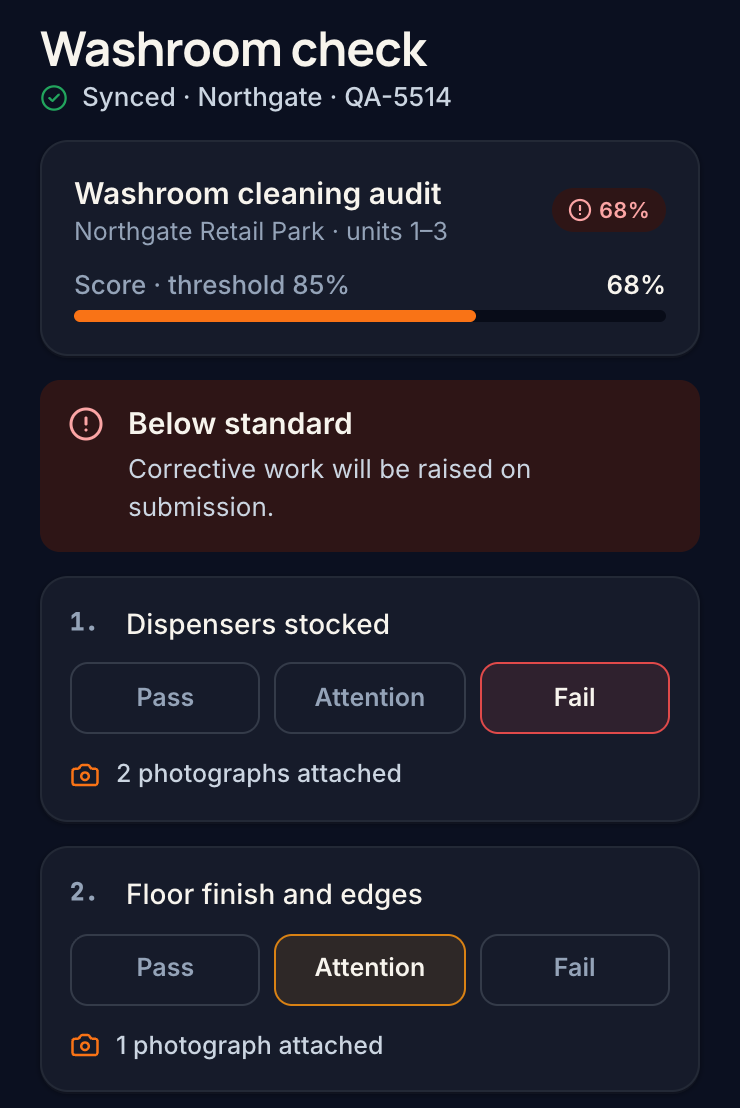
Ops · Northgate Retail Park · units 1–3
QA-5514 · Washroom audit
68% · Below standardThreshold: 85%
A score below the threshold raises corrective work with an owner and a due time, and the reinspection reads back against the original check.
Inspection follow-up workflow.
Photographs support the task record, the audit and client reporting. Reinspection closes corrective work against the original check.
Teams & attendance
Role, site assignment, training, competence, documents, availability and absence, against the service being delivered today.
The question a supervisor asks at 06:00: who is scheduled, available and ready to deliver the service?
Clock in and out against the site and the shift, with exceptions flagged rather than found at the end of the month.
Operational attendance records that export for payroll. Roveya does not run payroll.
Instructions & COSHH
Substance, hazards, PPE, dilution and exposure controls, storage, first aid, disposal and review date, held against the task and the sites it is used on.
The field team should be working from the current instruction set, not a laminated sheet from two contracts ago.
Current site information is held offline on the device.
Connected to Compliance & RAMS. Roveya holds and issues the COSHH record, it does not generate chemical risk assessments automatically.
Stock & equipment
A minimum level per item, per site, so an empty dispenser is a stock record, not a client complaint.
In stock
Low stock
Out of stock
Levels and states are updated by the person on site.
Stock held per site with a minimum level, updated by a person. Roveya is not warehouse software, and there is no chemical auto-ordering or smart dispenser integration.
Machines held against the site they serve and the operative holding them, with condition, inspection and maintenance on the same record.
Each machine record · Site · Custodian · Condition · Inspection · Maintenance · Damage · Availability
Southbank village
Eastgate campus
Meridian House
Northgate Retail Park
Kilmarnock · welfare
Connected to Asset Management. No IoT machine telemetry or usage-based servicing is claimed.
Management attention
Failed checks, missed work, absent operatives, stock shortages and equipment problems reach the manager with their site context.
Washroom check · Northgate · 68%
Units 4–6 common areas · 06:00
Bin store overflowing · Southbank
1 operative · Southbank round
Refuse sacks · Northgate · 0 left
Scrubber dryer · Southbank
Cleaning specification v3 · 2 operatives
History & reporting
Task completion, inspection scores by area, the issues raised and the corrective work that answered them, from the record the team created.
Tasks, inspections, issues, corrective work, evidence, attendance, documents, equipment and stock events, in the order they happened.
Cleaning activity, task completion and attendance
Inspection scores by area and supporting evidence
Issues, corrective actions and reinspection
Platform
Coordinate sites and service delivery.
Explore Roveya Admin →Complete work and capture evidence.
Explore Roveya Ops →See failed checks and act.
Explore Roveya Hub →Role-to-product examples show how teams may use the interfaces. Detailed permissions depend on configuration.
The round for today, the tasks on it and the photographs to capture.
Typical work: CompleteThe team on site, task allocation and completion checks.
Typical work: Assign · CompleteInspections, corrective work and cover when someone is absent.
Typical work: Assign · Review · CompleteOne site end to end: schedule, people, stock and equipment.
Typical work: Assign · Review · MonitorClient contracts, audit scores per site and reporting.
Typical work: Assign · Review · ReportExceptions across clients, sites and teams.
Typical work: Review · Approve · MonitorAudit standards, COSHH, training and evidence.
Typical work: Review · Approve · MonitorService position and failed checks only.
Typical work: MonitorWhere it fits
These are operating contexts Roveya suits, not customer references.
Connected solutions
Next step
Walk through scheduled tasks, quality inspections, corrective work and client reporting.