
Roveya Admin
Run project and back-office workflows.
Explore Roveya Admin →Construction & Civil
Roveya brings field delivery, workforce, compliance, project control and commercial workflows into one operating record built around the way construction and civil projects actually run.
Overview
Keep site evidence, people, compliance and commercial work attached to the project, from mobilisation to close-out.
One working day
What the site team records during the day is what the commercial team values at month end. Nobody rebuilds it from emails.
Site diary
Example data shown.
Projects & mobilisation
Work packages, sites, teams, compliance actions and the commercial position on one screen, read from live site activity, not a weekly update.
Client, project, sites, team, roles, dates, scope, required documents, RAMS, competence requirements and plant, set once, at the start.
What is created at mobilisation becomes the structure deployment, compliance, evidence and valuation all read from later.
Programme, work packages, people, compliance and commercial position.
Workforce
Operatives, supervisors, roles, competence records, training, certification expiry and site assignment, answered against this project.
The question a site manager actually asks: who is working here today, and are their requirements current?
On site & safety
The field record should be created where the work happens, by the people doing it.
Compliance
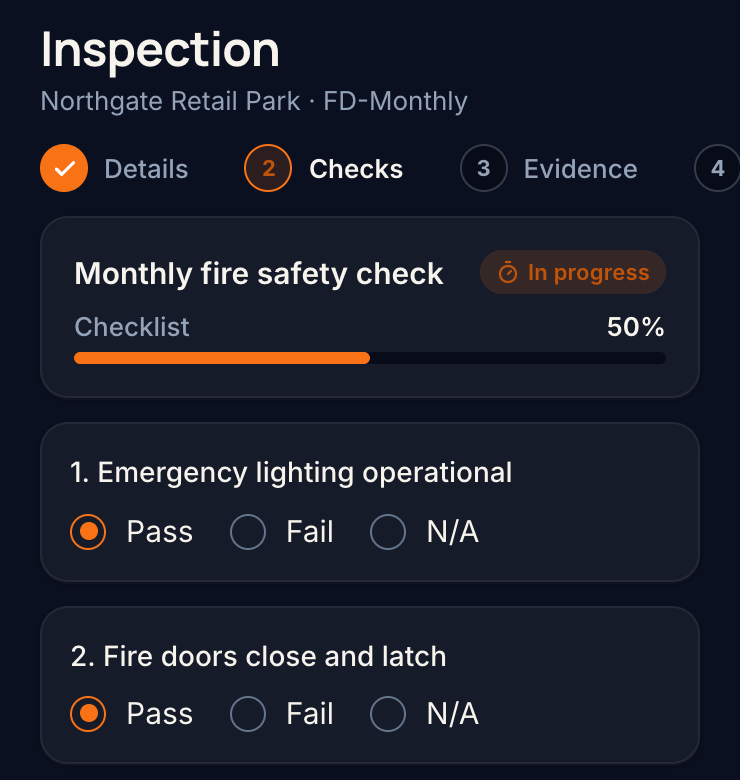
A RAMS belongs to an activity on a site, signed by the people doing the work. The inspection that follows it lands on the same record.
This is the construction view. The full records, versioning and audit trail live in Compliance & RAMS and are shared, not duplicated.
Issues
Damage, access problems, quality issues, safety concerns and incomplete work, raised once, with the site, the priority, the owner and the photographs.
Issue tracking against projects and sites, with evidence and an owner. Roveya is not a specialist snagging or defect-management product.
Plant & assets
Plant, access equipment and small tools held against the site and the person holding them, with inspection and maintenance state on the same record.
Connected to Asset Management. No GPS tracking, telematics or predictive maintenance is claimed.
Commercials
Valuation period, previous applications, current value, retention and CIS, supported by the work orders, inspections and hours already recorded on the project.
The supporting record is already connected
AfP 04 · PRJ-0241
Roveya keeps the record and the workflow. It is not tax-advice software, and return submission is not part of the product.
Each commercial record holds
How a project runs

01 · Mobilise
Packages, competence requirements and site documents are in place before the first operative arrives.
Project Management02 · Deliver
Diaries, deliveries, labour and progress are captured from Ops against the package they belong to.
Field Operations
03 · Check
Who briefed whom, what was inspected and what was signed, on the same record as the task.
Compliance & RAMS
04 · Value
Progress and variations feed the valuation, with the evidence behind every line.
Finance & AfPManagement & portfolio
Active projects and sites, operatives deployed, overdue inspections, compliance exceptions and commercial actions, enough to know where to look next.
Move from the active project or site to the exceptions that need a decision. Hub surfaces the context; Admin retains the project record.
Fire safety · Northgate Block C
Second fix electrical · Northgate
T. Berwick · IPAF not recorded
E. Okafor · Riverside Depot
Water ingress · unit 7
Compactor CP-02 · awaiting parts
Variation VAR-0012 · £8,400
AfP 04 · period to 21 Sep
Platform
Run project and back-office workflows.
Explore Roveya Admin →Do the work and capture site activity.
Explore Roveya Ops →See what needs attention and act.
Explore Roveya Hub →Role-to-product examples show how teams may use the interfaces. Detailed permissions depend on configuration.
Today’s work, the RAMS to sign, checks to complete and photos to capture.
Typical work: CompleteCrew on site, work allocation, inspections and sign-off.
Typical work: Assign · Complete · ReviewSite activity, compliance actions, plant and who is on site today.
Typical work: Assign · Review · MonitorProgramme, work packages, people, compliance and commercial position.
Typical work: Plan · Deploy · Review · ReportExceptions across projects and sites.
Typical work: Review · Approve · MonitorRAMS, inspections, evidence and outstanding actions.
Typical work: Review · Approve · MonitorDelivered work, supporting evidence and applications for payment.
Typical work: Review · Value · ReportInvoicing, CIS, payments and the commercial record.
Typical work: Invoice · Record · ReportDelivery position and critical exceptions only.
Typical work: MonitorWhere it fits
These are operating contexts Roveya suits, not customer references.
Connected solutions
Next step
Walk through how project setup, site evidence and Applications for Payment stay connected.